 If you’ve been reading blogs for awhile, you’ve probably noticed that some people have their picture next to the comments they leave. How do they get those snazzy photos up there? They have a Gravatar.
Gravatar is a free service that will automatically add your profile picture to comments, discussion forums, and other places around the web.
In this post, I’ll share how a Gravatar can help you get more traffic to your blog – and I’ll show you where to get your own.
Why do I need a Gravatar?
- Using a Gravatar helps build your “brand” online – whether it’s you as a blogger, your company, or your product. People who visit the same blogs regularly start to become familiar with the faces there – and that face could be yours!
- Having your photo beside your comments makes them stand out from the others. Other readers can see the person behind the comments, and this is important for building relationships with other members of your blogging community.
- Other blog visitors are more likely to click on your blog link when they see who’s commenting – sometimes a photo is enough to pique people’s curiosity, and they’ll visit your blog to find out more about you. This is especially effective if you’re a small blogger and commenting is part of your traffic-building strategy.
What should I use for my Gravatar?
Most bloggers just like to have their photo for their Gravatar – I do. It’s my way of introducing myself around the web – a kind of, “Hi, I’m Jeni. Nice to meet you.” If you’re representing your company, you may want to use a company logo or an image of your product. But if you’re not going for product recognition specifically, I’d stick to a photo.
A few tips:
- When using a photo of yourself, choose a photo where people can see your face well. Remember: this is an introduction, not a “Where’s Waldo.”
- Don’t be afraid to let your personality shine through! If you’re a little quirky or have a great sense of humor, a great photo can convey this to potential readers of your blog. Me? I smile a lot. A serious or “artistic” photo just wouldn’t do. 🙂
How do I get a Gravatar?
Simple. Go to the Gravatar website and sign up, then upload your photo. When you sign up, make sure you use the same email address you’re using around the web for comments. If you’d like to add more than one email address (for your multiple personalities identities), you can add them all onto the same account.
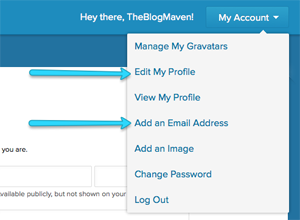
For the best experience across the web, add details to your Gravatar profile.
A few more tips for you:
- If you feel comfortable with giving more details about yourself, go through the Gravatar options and fill out your profile. This will show up in some unexpected places – for example, on sites (like mine) that support Gravatar hovercards (it’s like a business card that pops up when you hover over a person’s picture). Pretty cool.
- If you’ve left a trail of email addresses around the web over the years, you’ll want to add all of them onto your account. That way, no matter where you’ve commented, all your comments will show your photo.
- You don’t have to have your own blog to have a Gravatar. If you want to be social and show a photo beside the comments you leave, go ahead and sign up – even without a blog. It’ll help others start to recognize you as a member of the community – and that way, when you DO start blogging, you’ll have lots of people who already know you.
So what are you waiting for?
Pop over to Gravatar and get one. Then come back here and take it for a test drive in the comments below.