

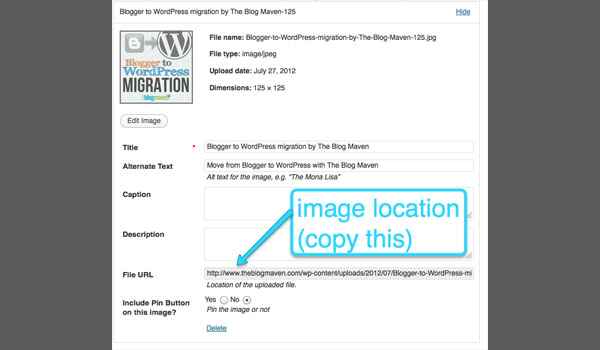
 Adding these grabbable buttons inside a post is a little trickier, and it’s because WordPress doesn’t display them well in the Visual editor. Before you add your button, make sure you’ve finished the rest of your post and have it looking exactly like you want it. Then switch over to the HTML view and find the right spot for it in your post. Copy and paste the code (above) into the post, replacing the variables (written in CAPS) with your correct information.
Leave a Comment:
20 comments


Hi Jeni! Thank you so much for this helpful post! I got it to work but have one little problem. On my website when I click on the button code to highlight it, that little screen goes blank… strange. Any ideas why that might be happening?
Reply
Hi Jennifer, I just went over to your site and…I’m completely stumped. It’s like the browser is reading that CSS as an input area, rather than a readonly textarea. I checked your HTML and it’s all in there fine. I’m wondering if it’s a CSS issue in your theme? Anyway – very frustrating. I’m sorry to not be of more help. :/
Reply


I’m trying to use this to add my button to my own sidebar…but it’s not working. I’m not sure what I’m doing wrong, because I feel like I followed all of your instructions. Does this only work for in a post and not in a sidebar or something?
Reply Okay, I put it back how I had it! It’s still not working…After I put your html into the “text/html” widget and filled in all of the information and clicked “save,” it deleted part of your code (the stuff at the end, I think?) from what was originally in the widget, as you’ll probably see. Just wanted to let you know that that wasn’t me who messed up, it’s WordPress that decided to get rid of it haha. Thank you so much for helping me out with this!
Reply I just found an article that explains why my code doesn’t work for people blogging on wordpress.com. It also has a tutorial for the way you can actually do what you want: http://bloggingwithsuccess.net/displaying-grab-button-code-free/
Hope this helps!
Jeni


You are a life saver! I have tried everything to fix this! I since I clone my post for our weekly linkup I will have to add fresh code each time?
Reply
Hello,
Thanks for this information. I was wondering if you know how to add the same functionality to a post page alongside social media buttons? My website is http://www.darrow.org.uk.
Many thanks
Reply
Thank you so much! This was a fabulous tutorial, and the best one I could find.
Reply
